Tag: RebelPSA

  • RebelPSA Wins ASCII Edge 2026 Award for Best Exhibit Showcase in San Antonio

    RebelPSA Wins ASCII Edge 2026 Award for Best Exhibit Showcase in San Antonio

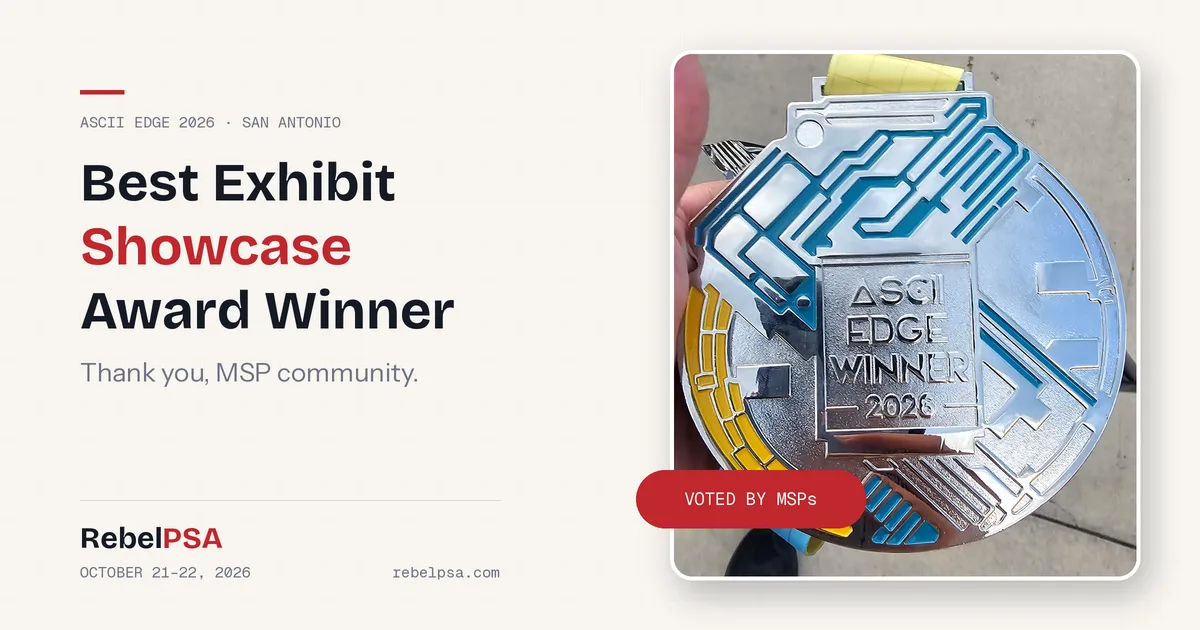
    We have some exciting news to share. RebelPSA won the Best Exhibit Showcase award at ASCII Edge 2026 in San Antonio, Texas. This award was voted on by the MSPs who attended the event on October 21–22, which makes it extra special to our team. It didn’t come from a panel of judges. It came from the people we built RebelPSA for.
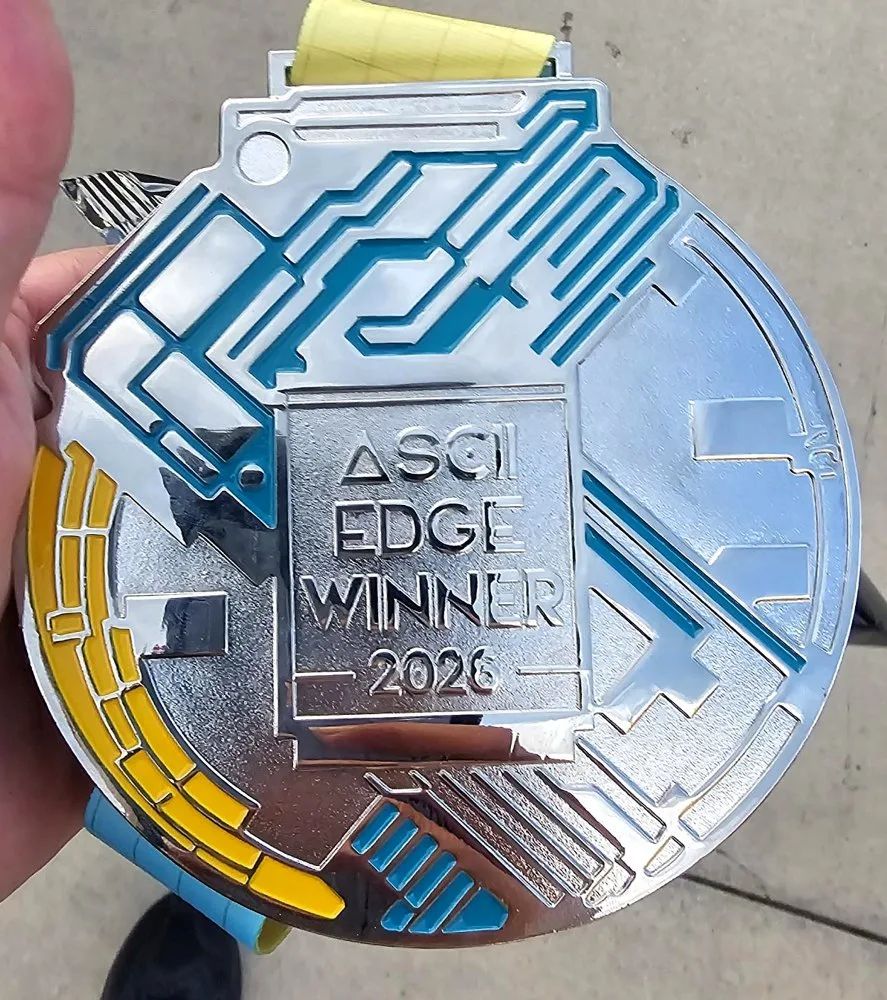
    The ASCII Edge Winner 2026 medal awarded to RebelPSA for Best Exhibit Showcase
    The ASCII Edge Winner 2026 medal for Best Exhibit Showcase.

    About the ASCII Edge 2026 Award

    ASCII Edge is a conference series from The ASCII Group, a community of independent managed service providers (MSPs) and IT solution providers. Each event brings MSPs together to learn, share ideas, and meet the vendors who serve them.

    At the San Antonio event, attending MSPs voted for the exhibit that stood out the most. They chose RebelPSA for the Best Exhibit Showcase. For a young company, being picked by the MSP community itself means a lot.

    Thank You to the MSP Community

    To every MSP who stopped by our table: thank you. You asked great questions. You told us honestly what works and what doesn’t in your day-to-day. You shared stories about juggling too many tools, chasing tickets, and trying to keep clients happy. Those conversations are the reason we’re here.

    We built RebelPSA to bring an MSP’s help desk, CRM, documentation, and integrations together in one place, so your team spends less time switching screens and more time helping clients. Hearing that this message connected with you, and then getting your vote, is the best feedback we could ask for.

    “This award means so much because it came from MSPs. They’re the people who live this work every day. We’re grateful to everyone who visited, shared their ideas, and voted. We’ll keep listening and keep building.”

    Matt Hutchings, CEO, Rebel Software

    Thank You to The ASCII Group

    We also want to thank The ASCII Group and its team for hosting ASCII Edge San Antonio. Putting on an event like this takes a huge amount of work. From the sessions to the networking to the exhibit hall, everything was well run and focused on helping MSPs grow. Thank you for creating a space where vendors and MSPs can truly connect.

    Back of the ASCII Group award plaque reading San Antonio, TX, Best Exhibit Showcase
    San Antonio, TX – Best Exhibit Showcase.

    What This Award Means for RebelPSA

    An award is nice, but what matters most is what we do next. This recognition tells us we’re on the right track. MSPs want a PSA that is simpler, more connected, and built around how they really work. We take that seriously, and we’ll keep using your feedback to guide what we build.

    Here’s what we heard most often at our table, and what we’re focused on:

    • Less vendor sprawl. Fewer disconnected tools and fewer logins.
    • A faster help desk. Clear ticket workflows that keep technicians focused.
    • Better client relationships. A CRM that shows the whole client, not just sales deals.
    • Documentation people actually use. Easy to write, easy to find.

    Missed Us in San Antonio?

    If you couldn’t make it to ASCII Edge, or you didn’t get a chance to stop by, we’d still love to meet you. Our ASCII show special is still open through November 30, 2026. It includes free onboarding, reduced conference pricing with a 24-month price guarantee, and a 60-day money-back guarantee. Visit rebelpsa.com/ascii to learn more.

    You can also read our ASCII Edge 2026 San Antonio announcement to see what we came to talk about.

    Frequently Asked Questions

    What award did RebelPSA win at ASCII Edge 2026?

    RebelPSA won the Best Exhibit Showcase award at ASCII Edge 2026 in San Antonio, Texas.

    Who voted for the award?

    The award was voted on by the MSPs who attended the event.

    What is RebelPSA?

    RebelPSA is a professional services automation (PSA) platform from Rebel Software, built for managed service providers. It brings the help desk, CRM, documentation, reporting, and integrations together in one place.

    Thank You, Again

    To the MSPs who voted, to everyone who stopped by, and to The ASCII Group: thank you. We’re proud of this award, and we’re even more excited about what’s next.

    — The Rebel Software Team
  • RebelPSA Is at ASCII Edge 2026 – San Antonio

    RebelPSA Is at ASCII Edge 2026 – San Antonio

    The Rebel Software team is on the ground in San Antonio, Texas, today and tomorrow — October 21–22, 2026 — for ASCII Edge 2026, The ASCII Group’s MSP-focused conference built by MSPs, for MSPs.

    Why We’re Here

    ASCII Edge brings managed service providers together for peer networking, candid conversations, and practical, real-world insight. That’s exactly the kind of room we want to be in. RebelPSA was built around a simple idea: MSPs don’t need another tool to juggle — they need a platform that orchestrates their integrations into actionable processes.

    We’re here to listen as much as we’re here to talk. We want to hear how your service desk, billing, and client communication actually work day to day, where things fall through the cracks, and what would make your team’s week easier.

    What to Talk to Us About

    • Vendor sprawl — how to cut down the number of disconnected systems your team logs into every day.
    • Service desk workflows — ticketing, email-to-ticket, and automation that keeps technicians focused on the work.
    • Client experience — built-in NPS, CSAT, and CES surveys delivered by email or SMS so you know how clients really feel.
    • Integrations — connecting the RMM, Microsoft 365, and finance tools you already rely on into one clear process.

    Come Say Hello

    If you’re attending ASCII Edge San Antonio, find us and introduce yourself — we’d love to compare notes on running a modern MSP. Can’t make it this time? Reach out anytime through rebelpsa.com and we’ll set up a conversation.

    See you in San Antonio.

    — The Rebel Software Team

  • Ask Your Data a Question: AI Reporting for MSPs

    Ask Your Data a Question: AI Reporting for MSPs

    Your PSA is full of answers. Which clients open the most tickets? Are SLA misses going up? Which agreements renew next quarter? The problem is getting those answers out. Building reports often means picking tables, fields, and filters, which only a few people on the team know how to do. AI reporting for MSPs makes it as easy as asking a question.

    In this post, we’ll look at how AI makes reporting easier, where it helps most, and how it works in RebelPSA’s Report Center.

    Why MSP Reporting Is So Hard

    • Too technical. Report builders can feel like writing code.
    • One “report person.” Everyone waits on the one person who knows how.
    • Data overload. A report with 500 rows doesn’t tell you what matters.
    • Missed warning signs. Problems hide in the numbers until it’s too late.

    How AI Makes Reporting Easier

    AI can help with the three hardest parts of reporting: building the report, choosing what to include, and understanding the results.

    Describe the Report in Plain Words

    In RebelPSA’s Report Center, you can type what you want, like “tickets by client for the last 30 days, sorted by count.” AI turns that into a report setup you can review and run. No need to know field names or filter rules.

    Get Column Suggestions

    Not sure what to include? AI can suggest columns that fit the report you’re building, so you don’t forget the important ones.

    Read a Quick Summary

    Once a report runs, AI can write a short summary of what the results show. Instead of scanning hundreds of rows, you get the key points first.

    Spot Unusual Results

    AI can flag numbers that look unusual, like a sudden jump in tickets for one client. That helps you catch problems early.

    What You Can Report On

    RebelPSA’s Report Center covers data from across the platform, including help desk tickets and SLA performance, CRM contacts and companies, sales opportunities and leads, survey responses, omnichannel messages, and RMM devices. Reports can be scheduled and delivered automatically, so the right people get the right numbers without asking.

    Reports Still Work Without AI

    AI in the Report Center is optional. You can build, run, schedule, and export every report by hand. If an AI feature is turned off or unavailable, the report still works. AI just makes it faster.

    Five Reports Every MSP Should Run

    1. Tickets by client. Find out who uses the most support.
    2. SLA performance. See where you’re missing response or resolution targets.
    3. Survey scores over time. Track whether clients are getting happier.
    4. Repeat issues. Find problems that keep coming back so you can fix the root cause.
    5. Upcoming renewals. Plan conversations before contracts end.

    Frequently Asked Questions

    Can I build a report just by describing it?

    Yes. With AI turned on, RebelPSA’s Report Center can turn a plain-language request into a report setup you can review and run.

    Can reports be sent automatically?

    Yes. Reports can be scheduled and delivered on a regular basis.

    Do I need AI to use the Report Center?

    No. All reporting works without AI. AI features are optional helpers.

    Your Data Has Answers. Ask for Them.

    Good decisions come from good information. With AI-assisted reporting, everyone on your team can get answers from your data, not just the report expert.

    See the RebelPSA Report Center. Visit rebelpsa.com to book a demo.

  • From Messy Notes to Clear SOPs: Using an AI SOP Generator at Your MSP

    From Messy Notes to Clear SOPs: Using an AI SOP Generator at Your MSP

    Every MSP has that one technician who knows how to do everything, and wrote none of it down. When they’re on vacation, the team is stuck. Writing standard operating procedures (SOPs) takes time nobody has. An AI SOP generator can change that by turning a quick, rough description into clear, step-by-step instructions in minutes.

    In this post, we’ll show how AI can help MSPs write SOPs faster, what to watch out for, and how it works inside RebelPSA’s Documentation Center.

    Why SOPs Don’t Get Written

    • No time. Tickets always feel more urgent than documentation.
    • Blank page fear. It’s hard to know where to start.
    • Writing is hard. Great techs aren’t always great writers.
    • It feels like it’ll change anyway. So why bother?

    The result is knowledge that lives in people’s heads. That’s risky. When someone leaves, the knowledge leaves with them.

    How an AI SOP Generator Helps

    Explaining a task out loud is much easier than writing a formal document. An AI SOP generator lets your technician describe the process in their own words, like they’re telling a coworker. The AI organizes it into a clean document with numbered steps.

    For example, a tech might type: “To onboard a new user, make the account in 365, give them the right license, add them to the sales group, set up MFA, then send the welcome email.” The AI turns that into a tidy, numbered SOP your whole team can follow.

    AI-Assisted Documentation in RebelPSA

    Smart SOP Generation

    In RebelPSA’s Documentation Center, a technician can describe a procedure in plain text, and AI creates a structured, step-by-step document. It opens right in the built-in editor, so the tech can review and adjust it before saving.

    Outline Suggestions

    Starting a new document? AI can suggest a starter outline based on the type of document you’re writing. It shows up in a side panel you can use or close. It’s never dropped into your document without your say.

    Keeping Docs Fresh

    Old SOPs can be worse than none at all. AI can help flag documents that look out of date and spot documents that seem to cover the same thing. Your team decides what to update, merge, or archive.

    Always Review AI-Written SOPs

    AI is a great first-draft writer, but it can make mistakes. It might put steps in the wrong order or add a step that doesn’t apply. Before saving any AI-written SOP, have the person who knows the process read it line by line. Better yet, have a second person test the steps. A wrong SOP can cause real damage.

    Tips for Better AI SOPs

    1. Be specific. Name the tools, settings, and groups involved.
    2. Include the “why.” Short reasons help readers avoid mistakes.
    3. Leave out passwords. Never include passwords or secret keys in what you give the AI.
    4. Add warnings. Note any step that could cause downtime.
    5. Test it. Have someone else follow the SOP once before you trust it.

    Frequently Asked Questions

    What is an AI SOP generator?

    It’s a tool that uses AI to turn a plain description of a task into a clear, step-by-step procedure.

    Can I edit the SOP after AI writes it?

    Yes. In RebelPSA, the generated SOP opens in the editor so you can review and change anything before saving.

    Can I write SOPs without AI?

    Yes. The Documentation Center works fully without AI. AI is an optional helper.

    Get Knowledge Out of Heads and Into Docs

    Your team’s knowledge is one of your most valuable assets. With AI doing the first draft, writing SOPs goes from a dreaded chore to a quick task.

    See AI-assisted documentation in RebelPSA. Visit rebelpsa.com to book a demo.

  • Stop Typing the Same Reply Twice: Help Desk Canned Responses That Save Hours

    Stop Typing the Same Reply Twice: Help Desk Canned Responses That Save Hours

    How many times did your team type “Can you please restart your computer and try again?” this week? Ten times? Fifty? Every one of those messages took a few minutes, and those minutes add up fast. Help desk canned responses fix that problem. They let your technicians send a clear, friendly answer in a couple of clicks instead of writing it from scratch every time.

    In this post, we’ll explain what canned responses are, why they matter for managed service providers (MSPs), and how snippets in RebelPSA make them easy to use.

    What Are Help Desk Canned Responses?

    A canned response is a saved message you can drop into a ticket reply. Some people call them templates, macros, or snippets. The idea is simple. You write a great answer once, save it, and reuse it whenever the same question comes up.

    Good canned responses are not just copy and paste. They can fill in details like the client’s first name. That way, each reply still feels personal, even though your tech didn’t type the whole thing.

    Why MSPs Need Canned Responses

    MSP help desks answer many of the same questions over and over. Password resets. Printer problems. “How do I connect to the VPN?” These are important, but they are not hard. Your technicians should save their brainpower for the hard problems.

    • Save time. A reply that took five minutes now takes thirty seconds.
    • Keep answers consistent. Every client gets the same correct steps, no matter who answers.
    • Help new technicians. New hires can send polished answers on day one.
    • Protect your brand. Replies follow the tone and wording your company wants.
    • Reduce mistakes. Fewer typos and fewer missed steps.

    How Snippets Work in RebelPSA

    In RebelPSA, canned responses are called snippets. Your techs can reach them right from the ticket reply box, so they never have to leave the ticket to find the right words.

    Personal and Shared Snippets

    Every technician can build personal snippets that match the way they like to say things. Your team can also share snippets, so everyone uses the same approved answers for common issues.

    Fill-In Details Automatically

    Snippets can include placeholders, like a contact’s name or company. When a tech inserts the snippet, RebelPSA fills in those details. The client sees a reply that is about them, not a form letter.

    Rich Formatting and Macros

    Some answers need numbered steps, bold warnings, or links. Snippets support rich text, so replies look clean and easy to follow. For bigger jobs, the snippet library also includes a macro layer that helps your team handle common steps together instead of one at a time.

    Optional AI Help

    If your company turns on AI features, snippets can get extra help, like wording suggestions. AI is always optional. Snippets work fully without it.

    Tips for Writing Great Canned Responses

    1. Start with your top ten questions. Look at last month’s tickets and find the questions you answer most.
    2. Keep it short. Use short sentences and simple words. Your client may be stressed.
    3. Use numbered steps. Steps are easier to follow than a big paragraph.
    4. Add a personal touch. Use the client’s name and leave room for one custom sentence.
    5. Review them every few months. Software changes, so make sure your steps still work.

    Canned Responses Should Not Sound Canned

    The biggest worry with saved replies is that they sound like a robot. That’s why personalization matters. Train your team to insert a snippet and then add one sentence that fits the person. For example: “I know you have a big meeting at 2:00, so let’s get this fixed fast.” That one line makes the whole reply feel human.

    Frequently Asked Questions

    What is the difference between a canned response and a macro?

    A canned response is saved text you add to a reply. A macro can do more, like help with several steps on a ticket at once. RebelPSA supports both through its snippet library.

    Can each technician have their own snippets?

    Yes. Each user can create personal snippets, and teams can also share approved snippets with everyone.

    Do snippets work on mobile?

    Yes. RebelPSA’s snippet library was built with mobile support, so techs can use saved replies on the go.

    Start Answering Faster

    Your technicians are too valuable to spend their day retyping the same answers. With snippets in RebelPSA, they can reply faster, stay consistent, and save their energy for the tickets that really need it.

    Want to see snippets in action? Visit rebelpsa.com to book a demo.

  • Switching Documentation Tools Without Starting From Scratch

    Switching Documentation Tools Without Starting From Scratch

    Many MSPs know their documentation tool isn’t working for them. But they stay anyway. Why? Because moving years of client notes, asset records, and how-to articles feels impossible. Nobody wants to copy thousands of pages by hand. A good MSP documentation migration should move your knowledge for you, safely, so your team can switch tools without starting from scratch.

    In this post, we’ll explain what makes a migration safe, what to watch out for, and how we’re building import tools into RebelPSA’s Documentation Center.

    Why MSPs Put Off Switching

    • Too much content. Years of documentation can mean thousands of records.
    • Fear of losing data. What if something important doesn’t come over?
    • Messy structure. Records in the old tool might not match the new one.
    • Downtime. Your team can’t stop working while you move.

    These are real worries. A good migration process answers each one.

    What a Safe Documentation Migration Looks Like

    Preview Before You Import

    RebelPSA’s import tools are designed to show you a summary first: what will be brought over and where there might be conflicts. You decide before anything changes.

    Keep Your Structure

    Your old tool organized information by client, asset type, articles, and folders. The import maps each of these to its matching place in RebelPSA: clients, structured documentation templates, knowledge base articles, and folders. Your team will recognize their documentation in its new home.

    Runs in the Background

    Large imports run in the background. Your team keeps working while the move happens.

    An Undo Button

    Mistakes happen. RebelPSA tracks each import batch, so if something doesn’t look right, you can roll that batch back within a set window instead of cleaning up by hand.

    A Note About Passwords

    Many documentation tools store passwords. For security, RebelPSA does not copy password values during an import. Instead, it creates a placeholder so you know a credential belongs there, and your team re-enters it securely. This keeps passwords from passing through export files, where they could be exposed. It takes a little extra time, but it’s the safe way to move sensitive data.

    Tips for a Smooth Migration

    1. Clean up first. Archive old clients and outdated docs before you move.
    2. Start with one client. Test the import on a small client and check the results.
    3. Plan your templates. Decide how asset types should look in the new system.
    4. Schedule password re-entry. Give your team time to add credentials securely.
    5. Tell your team. Let everyone know the switch date and where to find things.

    Frequently Asked Questions

    Will my documentation keep its structure?

    Yes. The import maps clients, assets, articles, and folders to matching places in RebelPSA.

    Are passwords imported?

    No. For security, password values are not imported. RebelPSA creates placeholders so your team can re-enter them safely.

    Is documentation import available now?

    Documentation import has been released for many competitor document centers, but we continue to do development and testing to further enhance the import process. Contact us to talk about your migration and timing.

    Switch Tools. Keep Your Knowledge.

    Your documentation is years of hard-won knowledge. You shouldn’t have to give it up to get a better tool. With a safe, structured migration, you can move forward and bring your knowledge with you.

    Thinking about switching? Visit rebelpsa.com to talk with our team.

  • No More Blank Pages: IT Documentation Templates That Keep Every Client Consistent

    No More Blank Pages: IT Documentation Templates That Keep Every Client Consistent

    Open the documentation for two different clients. Does it look the same? For many MSPs, the answer is no. One client has a neat page for every server. Another has a single long note that says “see email from Steve.” When every technician writes documentation their own way, nobody can find anything. IT documentation templates fix this by giving every client the same clear structure.

    In this post, we’ll explain what documentation templates are, why they matter, and how RebelPSA’s Documentation Center makes them easy to use.

    The Blank Page Problem

    A blank page is hard to fill. When a technician starts from nothing, they have to decide what to include, how to organize it, and what to call things. Most people skip important details, like the warranty date or the admin login location, just because nobody asked for them.

    A template does the deciding ahead of time. It asks the right questions, so the technician only has to answer them.

    What Are IT Documentation Templates?

    A documentation template is a ready-made layout for a certain kind of record. For example, a “Firewall” template might include fields for the make and model, the IP address, the firmware version, and the renewal date. Every firewall you document uses the same fields in the same order.

    Common templates for MSPs include:

    • Servers and network devices
    • Internet and phone service providers
    • Software licenses and renewals
    • Backup systems
    • Office locations and contacts

    How Templates Work in RebelPSA

    Build a Layout Once

    In RebelPSA’s Documentation Center, you create a layout with the fields you need. Each field has a type, like text, a date, or a number. That keeps the data neat. A date field always holds a date, not “sometime in March.”

    Fill It In for Every Client

    When a technician documents something new, they pick the template and fill in the blanks. Every client’s records follow the same pattern, so anyone on your team can jump in and understand them.

    Placeholders Save Typing

    Templates can use placeholders that fill in known details for you, so your team isn’t retyping the same information again and again.

    Easy to Search

    Because template fields are part of the Documentation Center’s search, you can find records by the values inside them, like a serial number or a model name.

    Optional AI Auto-Fill

    If your company turns on AI, RebelPSA can suggest values for template fields based on client information already in the system. Your technician reviews the suggestions before saving. Templates work fully without AI.

    Tips for Building Good Templates

    1. Start with your most common items. Firewalls, servers, and backups are good first templates.
    2. Ask “what do we need at 2:00 a.m.?” Include the details someone needs during an emergency.
    3. Keep it short. Too many fields and people stop filling them in.
    4. Get feedback. Ask your techs which fields they actually use.
    5. Update over time. Add fields when you notice something is always missing.

    Frequently Asked Questions

    What is an IT documentation template?

    It’s a ready-made layout with set fields for a certain kind of record, like a server or a firewall, so every record has the same information.

    Can I create my own templates?

    Yes. In RebelPSA, you can build your own layouts with the fields your team needs.

    Can I search by what’s inside a template?

    Yes. Template field values are included in Documentation Center search.

    Same Structure, Every Client

    Consistent documentation means faster fixes, easier handoffs, and fewer “where is that?” moments. Templates give your team a head start every time.

    See documentation templates in RebelPSA. Visit rebelpsa.com to book a demo.

  • Find Any Ticket in Seconds: Saved Views, Smart Filters, and Bulk Actions

    Find Any Ticket in Seconds: Saved Views, Smart Filters, and Bulk Actions

    A busy help desk can have hundreds of open tickets. If your technicians have to scroll and hunt to find their work, they lose time before they even start. Good help desk ticket management is not just about closing tickets. It’s about helping each person see the right tickets at the right moment.

    This post covers three simple tools that make a huge difference: saved views, smart filters, and bulk actions. We’ll also show how RebelPSA puts all three right on the ticket list.

    The Problem With One Big Ticket List

    Picture a single list with every ticket in your company. Old tickets, new tickets, urgent tickets, and tickets waiting on a client are all mixed together. Every technician has to sort through the pile to find what matters to them. That leads to real problems:

    • Urgent tickets get missed.
    • Technicians work on the wrong things first.
    • Managers can’t quickly see what is stuck.
    • People waste time doing the same sorting every morning.

    The fix is to give each person a view that fits their job.

    Saved Views: Your Personal Ticket Lists

    A saved view is a ticket list you set up once and come back to anytime. It remembers your filters, your columns, and how you like things sorted. In RebelPSA, saved views appear as tabs across the top of the ticket list. Click a tab, and your list changes instantly. You might have views like:

    • My Open Tickets
    • Unassigned – New Today
    • Waiting on Client
    • High Priority – All Boards

    You can set any saved view as your default. If you change a filter while a view is open, RebelPSA marks the view as changed. Then you can choose to save your changes or throw them away. No surprises.

    Smart Filters: Narrow It Down Fast

    Filters help you shrink a long list to just what you need. RebelPSA includes a quick filter bar for everyday searching and an Advanced Filter Panel for deeper digging. You can filter by status, priority, company, assigned tech, dates, and much more.

    There are also handy one-click presets. Flagged shows tickets someone marked for attention. Followed shows tickets you personally chose to watch.

    Choose the Columns You Care About

    Every team tracks different things. With the column chooser, you pick which columns show up in your list. Want to see when the last comment was added? Add the Last Comment Time column. Your column layout saves right along with your view.

    Bulk Actions: Do Ten Things at Once

    Sometimes you need to make the same change to many tickets. Maybe a technician is out sick, and their tickets need to move. Maybe a big outage created twenty tickets that all need the same update.

    With bulk actions in RebelPSA, you select the tickets and make the change once. You can assign tickets, change status, move tickets, change priority, add or remove tags, close tickets, and export them. You can even select every ticket that matches your current filter, not just the ones on the screen. Bigger jobs run in the background, so you can keep working while RebelPSA finishes the update.

    Different Layouts for Different People

    Not everyone likes to work the same way. RebelPSA lets you switch between layouts:

    • Grid view for a classic list.
    • Kanban view to see tickets as cards moving through stages.
    • Split view to see the list and a ticket side by side.

    There’s also a quick-preview panel, so you can peek at a ticket without fully opening it.

    Frequently Asked Questions

    What is a saved view in a help desk?

    A saved view is a ticket list with your filters, columns, and sorting already set. You can return to it with one click instead of setting it up again.

    Can I change many tickets at once?

    Yes. RebelPSA’s bulk actions let you assign, update, move, tag, close, or export many tickets in one step.

    Can each technician have different views?

    Yes. Each person can build the views that match their work and set their own default.

    Less Searching, More Solving

    Great help desk ticket management means your team spends less time looking for work and more time doing it. Saved views, smart filters, and bulk actions turn a messy list into a clear plan for the day.

    See how RebelPSA organizes your help desk. Visit rebelpsa.com to book a demo.

  • See the Whole Client on One Screen: A CRM Built for MSPs

    See the Whole Client on One Screen: A CRM Built for MSPs

    Most CRMs were built for sales teams. They’re great at tracking deals, but they don’t know much about what happens after the deal closes. For a managed service provider, that’s where the real relationship begins. You need a CRM for MSPs that shows the whole client: the people, the tickets, the agreements, and the history, all on one screen.

    In this post, we’ll explain what an MSP needs from a CRM and how RebelPSA brings everything about a client together.

    Why Generic CRMs Fall Short for MSPs

    When your CRM is separate from your help desk, your team has to jump between tools to answer simple questions:

    • Who is the main contact at this client?
    • How many tickets have they opened this month?
    • When does their agreement renew?
    • What did we talk about at the last review?

    Every jump wastes time and raises the chance of missing something. An MSP CRM should answer all of these from one place.

    One Screen for the Whole Client

    RebelPSA’s CRM is built into the same platform as the help desk. When you open a company, you see the full story.

    Activity Timeline

    The activity timeline shows what has happened with a client over time: emails, calls, meetings, and other activity, in order. New account managers can catch up on a client in minutes instead of days.

    Org Charts and Relationships

    Clients are made of people. RebelPSA lets you link contacts to companies, mark VIPs and primary contacts, and see an org chart of who reports to whom. One contact can even be linked to more than one company, which is common for consultants and owners of several businesses.

    Parent and Child Companies

    Some clients have several locations or brands. With parent and child company support, you can keep each location separate while still seeing the big picture.

    Account Teams

    Who owns this client relationship? Who is their main technician? Account team management shows the people on your side who are responsible for each client, so nobody has to guess.

    Health and Agreements

    Each company record shows a client health score and its agreements, including renewal reminders. You can spot risks and upcoming renewals without opening a separate system.

    Lists That Work the Way You Do

    The company and contact lists in RebelPSA include tags, saved views, a column chooser, inline editing, advanced filters, and a quick-preview panel. There’s even a map view to see where your clients are located. Find the right client fast, update a field without opening the record, and move on.

    Optional AI Account Briefs

    Getting ready for a client call? If your company turns on AI, RebelPSA can generate an account brief that sums up the client’s recent history. It’s a fast way to prepare. Like all AI features in RebelPSA, it’s optional.

    Frequently Asked Questions

    What makes a CRM good for MSPs?

    A good MSP CRM connects client records with tickets, agreements, and support history, so your team sees the full relationship, not just sales deals.

    Can one contact belong to more than one company?

    Yes. RebelPSA supports linking a contact to multiple companies, with roles like primary contact or VIP.

    Does the CRM connect to the help desk?

    Yes. The CRM and help desk are part of the same RebelPSA platform, so client information is shared between them.

    Know Your Clients Better

    Strong client relationships start with knowing your clients. When every detail lives on one screen, your team can give better service, have better conversations, and spot problems sooner.

    See the RebelPSA CRM in action. Visit rebelpsa.com to book a demo.

  • Spot Unhappy Clients Before They Leave: Client Health Scores for MSPs

    Spot Unhappy Clients Before They Leave: Client Health Scores for MSPs

    Most clients don’t leave without warning. The warning signs are usually there for months. Tickets go up. Survey scores go down. The main contact stops answering emails. The problem is that these signs are spread across different places, so nobody sees the full picture until the cancellation letter arrives. An MSP client health score brings those signs together in one simple number.

    In this post, we’ll explain what a client health score is, which warning signs matter, and how RebelPSA helps you act before it’s too late.

    What Is a Client Health Score?

    A client health score is a quick rating that shows how a client relationship is doing. Think of it like a check-engine light for each account. A healthy score means things are going well. A dropping score means it’s time to pay attention.

    The score is built from real data, not gut feeling. That matters, because the clients who complain the loudest are not always the ones most likely to leave. Sometimes the quiet client is the one at risk.

    Warning Signs Every MSP Should Watch

    • Rising ticket volume. More problems often mean more frustration.
    • Falling survey scores. Lower CSAT or NPS ratings are a clear signal.
    • Less contact. Fewer emails, calls, or meetings can mean the client is pulling away.
    • Missed reviews. Skipped business reviews mean fewer chances to show your value.
    • Changes at the client. A new owner or a new main contact can reset the relationship.

    How Client Health Scores Work in RebelPSA

    RebelPSA includes a built-in health score engine in its CRM. Because your help desk, surveys, and client records already live in RebelPSA, the score can use live data from across the platform. There’s no spreadsheet to update and no data to copy by hand.

    See Health Where You Work

    Each company record shows its health score, so account managers see it every time they open a client. You can also add health scores to company lists and reports to spot trouble across your whole client base.

    Lifecycle Stages Add Context

    A brand-new client and a ten-year client need different care. RebelPSA tracks a lifecycle stage for each company, so you can read the health score with the right context.

    Optional AI Insights

    If you choose to turn on AI, RebelPSA can add extra help, like churn risk scoring, unusual-activity alerts, and next-best-action suggestions. These tools point out where to look first. Your team still makes the call, and the health score works fully without AI.

    What to Do When a Score Drops

    1. Look at the details. Find out which signals changed. Is it tickets, surveys, or silence?
    2. Reach out personally. A real phone call goes a long way. Ask how things are going.
    3. Fix the root cause. If one system keeps breaking, plan a real fix instead of more patches.
    4. Schedule a business review. Show the client what you’ve done and what’s next.
    5. Follow up. Watch the score over the next few weeks to make sure it recovers.

    Frequently Asked Questions

    What is an MSP client health score?

    It’s a rating that shows how healthy a client relationship is, based on real data like support activity and satisfaction.

    Do I need AI to use health scores?

    No. RebelPSA’s health score engine works without AI. AI features are optional extras you can turn on if you want them.

    How often should I check client health?

    Review your at-risk clients at least weekly. Because the score uses live data, it’s always current when you look.

    Keep the Clients You’ve Earned

    Winning a new client costs far more than keeping one you already have. A client health score helps you see trouble early, so you can fix it while there’s still time.

    See client health scores in RebelPSA. Visit rebelpsa.com to book a demo.